First basic petition is a good connection, does not advance if he is 1mb, 2mb until 8mb… these speeds comumente divulged by the suppliers of broad band (Velox, Speedy, Way, Virtua, etc) are the speeds of download. What 1mb already decides. But the important one is the speed of upload, little divulged by the ones for these companies. In all sites of the suppliers that I entered, from 2mb already the maximum of upload disponibilizava, that he was 600kb, what of approximately the 12 the 14 slots.
After having a good connection, it comes the good hardware. The ideal for, at least, 8 slots is 1GB of RAM. Pra to twirl 12 the 14 slots, the ideal is, at least, 1,5GB of RAM.
A good processor also and essential for a good performance of the dedicated server. A minimum of 1,6Ghz for 8 slots, varying for 2,0Ghz for 14 slots.
Lowering archives and installing
First step is to lower the tool of valve that low the archives and keeps the server brought up to date, with updates of valve. For this It makes the Download of the HLDS Update Tool and executes the installer. It goes to solocitar a folder, in ours in case that we go to use C:\srcds\ below in agreement the screen.
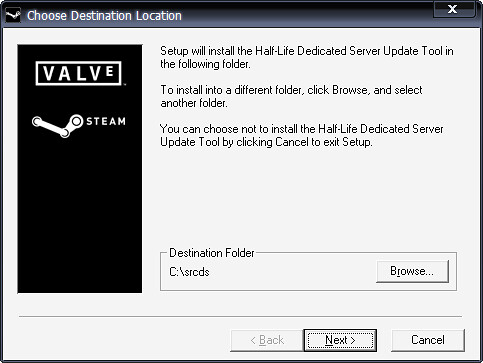
After to install, will be necessary to execute this “atualizador” pra it to lower all necessary archives for execution. It would be necessary to execute the following line of command, or to create a shortcut in the same folder (c:\srcds\) with the following parameters:
c:\srcds\hldsupdatetool.exe - command update - game “Counter-Strike Source” - to dir. \ css On the first time that to execute, it will make download of all necessary archives for the folder css, inside of the c:\srcds folder. But he can prepare noitada pra to leave lowering, because in the total he must give 1,25 GB more or less alone of archives. E the speed is not always in the best ones. From there, all time that to execute this shortcut (or command) it will bring up to date the server, lowering only updates. (Calm that they are few When it possesss)
I do not know if he happens with all, exactly after everything soon and still having executed, the server can not create the archive with the configurations, and only use the values standard. Then link with a “generator of server.cfg” goes one here. Remembering that the generated archive will have to be in the folder: cstrike \ cfg, inside of the folder of creation of the server, that is, in ours case the complete way of the archive would be: c:\srcds\css\cstrike\cfg\server.cfg.
Creating Shortcuts in the Area of Work
Simple. Clica with the right button in” the New” Desktop Shortcut. In the field “command line”, to fill with:
C:\srcds\css\srcds.exe - autoupdate - game cstrike - tickrate 66 +mp_dynamicpricing 0- autoupdate: to bring up to date the server automatically, whenever it has new;
- game cstrike: folder of the content of the game, cstrike;
- tickrate 66: tickrate is one hitorinha a little more complicated, but basically they vary between 33, 66 and 100. How much bigger, bigger the tax of update between serving customer; greater also the consumed resources of the computer. 66 are an excellent value;
e finally, +mp_dynamicpricing 0, this is pra to take off the price dynamic of the Valve, that makes a Eagle to be valid 1300$ more than.
Good, now it is the part most easy, to only initiate. Clica 2x in the shortcut. The interface is well simple and it does not have secret none. It looks at:
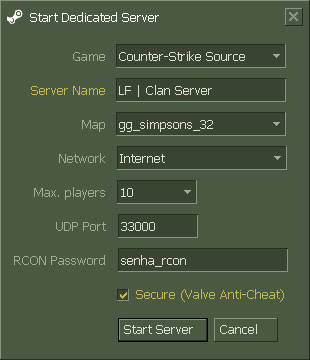
Detailing:
- Game: name of the game (counter-strike source)
- Server name: name of the server pra to appear in the list steam of it
- Map: map that goes to start
- Network: Net… Internet and lan, or alone lan
- Max players: Maximum amount of players. Slots. (after initiating the server, it only obtains to modify to restart it).
- UDP Port: Door in which the server it goes to function. Important for people who use roteador, that is necessary to use the redirecionamento of doors (port fowarding) until its IP. More information: portforward.com (it in accordance with selects its to router).
Normally I have used different of the standard (27016), because some operators of broad band have practised Traffic Shaping in main doors of great utlização/traffic. - RCON Password: Used password pra “remote control” of the server, saw console.
- Secure (Valve Anti-Cheat): Nor it needs to speak very. It looks at here and here.
Finishing
Case the alone server of lag with you yourselves follows the following steps.
- After the server being executing.
- It opens the Gerenciador de Tarefas of the Windows (Ctrl+Alt+Del… or Ctrl+Alt+Del” Gerenciador de Tarefas… or Menu to initiate” To execute…” taskmgr” [to enter])
- `Goes in the Guide (border) Processes `
- It looks for the process of the server (srcds.exe)
- Clica with the right button of mouse” To define Priority” Real Time (or, at least, High)


